


How to Make a Dynamic QR Code for a PDF (The Free Google Drive Hack)
Since the pandemic, the hospitality and real estate industries in the US have fundamentally changed. If you walk into a trendy BBQ joint in Austin, Texas, you won’t find a sticky, laminated menu on the table. You’ll find a sleek, acrylic stand with a QR code.
If you are a realtor showing a luxury home, a local contractor leaving a digital portfolio on a doorknob, or a restaurant owner digitizing your menu, you need a qr code for pdf.
But before you jump onto Google and click the first “PDF QR Code Generator” you see, you need to know about the most expensive trap in the industry—and the 100% free “Google Drive Hack” you should be using instead.
The $240/Year PDF Hosting Trap
Here is how the big QR code companies trick you. You go to their website and select “Upload PDF.” You drag and drop your beautifully designed 3MB menu directly onto their server. It generates a nice little QR code.
Fourteen days later, that code breaks.
You get an email stating your “trial” has ended. Because they are physically hosting your PDF file on their web servers, they claim they need to charge you a massive premium—usually around $20 to $30 a month. That is $240 a year just to host a single PDF file! It is an absolute ripoff.
The “Google Drive Hack” (Do This Instead)
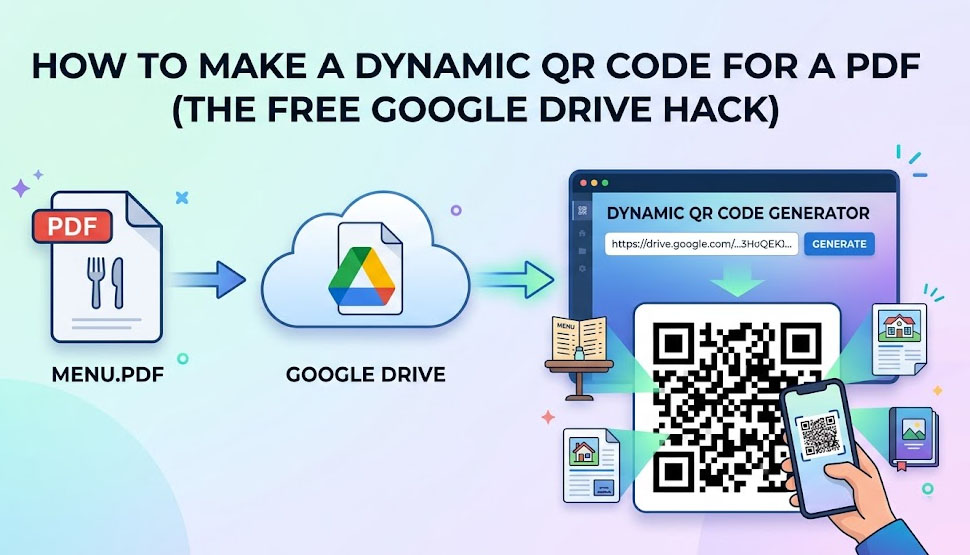
To create a truly free dynamic QR code for a PDF, you need to separate the hosting of the file from the generation of the code.
Google Drive gives you 15GB of rock-solid cloud hosting for absolutely free. Why would you pay a QR code company to host your file when Google will do it better, faster, and for zero dollars?
Step 1: Host Your PDF for Free
- Log into your free Google Drive (or Dropbox) account.
- Upload your PDF file (e.g., “Spring_Menu_2026.pdf”).
- Right-click the file and select “Share.”
- This is the crucial step: Under General Access, change “Restricted” to “Anyone with the link.”
- Click “Copy Link.”
Step 2: Generate the Dynamic QR Code
Now that your PDF is safely hosted on Google’s billion-dollar servers, you just need to point a QR code to that link.
- Go to a free generator like MakeDynamicQR.
- Do NOT look for a “PDF Upload” button. Instead, select the standard URL / Link option.
- Paste the long Google Drive link you just copied.
- Make sure it is set to Dynamic (this is vital for future updates).
- Customize your design, add a “Scan for Menu” frame, and click Save.
Why It MUST Be a Dynamic QR Code
Let’s say the cost of beef goes up, and you need to increase the price of your brisket burger by $2.00.
If you used a static QR code, you would have to throw away all your printed acrylic table stands.
But because you followed the hack above and used a Dynamic QR Code, updating your menu takes 60 seconds and costs nothing:
- Edit the PDF on your computer with the new prices.
- Upload the new PDF to Google Drive and grab the new sharing link.
- Log into your MakeDynamicQR Dashboard.
- Click “Edit” on your menu’s QR code and paste the new Google Drive link over the old one.
Just like magic, every single QR code printed inside your restaurant instantly routes to the updated menu. No reprinting. No downtime. No $20 monthly fees.
Stop Overpaying for Simple Tech
A qr code for pdf is just a bridge between a physical phone and a digital file. You should never pay a toll to cross that bridge.
By leveraging free cloud storage like Google Drive and pairing it with our unlimited, free routing system, your business can look highly professional on a bootstrap budget.